Building an AI Agent From Scratch
Breaking down the core concepts of AI agents by building Raked, a minimal AI assistant in TypeScript
Late 2025 felt like a massive jump in the AI landscape. We were already used to getting new powerful base models (like the impressive Opus 4.5) every other month, but then Openclaw (a.k.a. ClawdBot / Moltbot) was released. It was a slick, suspiciously capable assistant, and for a moment, it genuinely felt like AGI had arrived. Damn, permanent underclass it is.
But was that really the case? Was this actually AGI, dark magic... or just really good plumbing?
In a recent podcast, Naval Ravikant pointed out that "AI anxiety" almost always stems from simply not understanding what it is or how it works. When something feels like a black box, it feels like a threat. The prescription is simple: learn enough of what's happening "under the hood" to know where to trust it, where to distrust it, and how to reduce fear through informed action.
When it comes to using new AI tools, people usually fall into two camps:
- (1) The YOLO Crowd: Yes, install, root access, yes to all.
- (2) The Untrusting Cats: Pragmatic, skeptical, and staring at the black box with narrowed eyes.
Some of us at BuidlGuidl fall squarely into the second camp. So to cure our own AI anxiety, we decided to go straight to the source. We started looking into Openclaw (and a minimal Python version of it, nanobot) to really understand where the magic came from.
Openclaw goes thousands of lines of code deep, bringing up immediate concerns about security, utility, bloat, and waste. But to be fair, that complexity exists because OpenClaw is trying to be everything. And in many ways, it succeeds... It's legitimately impressive.
As we peeled back the layers, we found that the actual "AI" part is incredibly small. The vast majority of the code is just integrations: plumbing for messaging, auth, interfaces, scheduling, etc.
With a clear high-level picture, we decided to build Raked: a minimal AI assistant written from scratch in TypeScript. It has one primary goal: readability. It's just a few hundred lines of code. You can understand it in 30 min, fork it, and build your own custom agent without drowning in bloat.
The goal of this article is to show you exactly what the "magic" is and break down the core concepts of AI agents.
It's just the harness
In the context of AI agents, the harness is everything that isn't the raw call to the LLM. It's the scaffolding that manages everything the model can't do on its own: maintaining session history, running tools, switching between models, handling configurations, etc.
This is how a harness-less agent would look like:
**You:** Hey, what can I do if I go to Barcelona?

**Model:** Barcelona sounds fun! Here are some top things
to do in Barcelona: ...

**You:** What is the best beach around there?

**Model:** I'd be happy to help you find the best beach!
Could you tell me what city, region, or area you're asking about?
Without a basic harness (like session memory), every request is treated in complete isolation.
Context is all you have
Unless you're actively fine-tuning a model, the only way to give an AI custom knowledge, data, or instructions (i.e., context) is to just shove it into the text payload (i.e., prompt) you send to the API. Every architectural piece of an agent is built around this exact constraint: figuring out how to give the LLM the best possible context.
Here is what a payload could look like:
<system prompt>
<saved memory from other sessions>
<session conversation history>
<tools available for the LLM to use>
...
<user message>
So when an agent feels spooky AGI-like, remember it's really just smart prompting running on top of a powerful base model. Most of the "magic" is literally just piling a bunch of text together and shipping it off to the LLM.
Context windows
This is the amount of text the LLM can process in one go. Context windows are getting massive: up to 1 million tokens (which is roughly 10-15 books worth of text). That's a lot of space, but just because you have it doesn't mean it's a good idea to use it all. Models actually get dumber as you add more context (signal-to-noise ratio issue). You need to be highly selective with what goes in there, how you structure it, and keep an eye on your utilization rate so your LLM doesn't drown in filler.
With that high-level picture out of the way, let's dive into how we actually wired these pieces together to build Raked.
Raked: A minimal AI assistant in TypeScript
As we mentioned in the intro, we built Raked to isolate the actual AI components of an agent and wire them together into something simple but functional. Out of the box, it only works with Claude/Anthropic, and you can interact with it via CLI repl or Telegram.
Before we get into how to run it, let's look at the architecture.
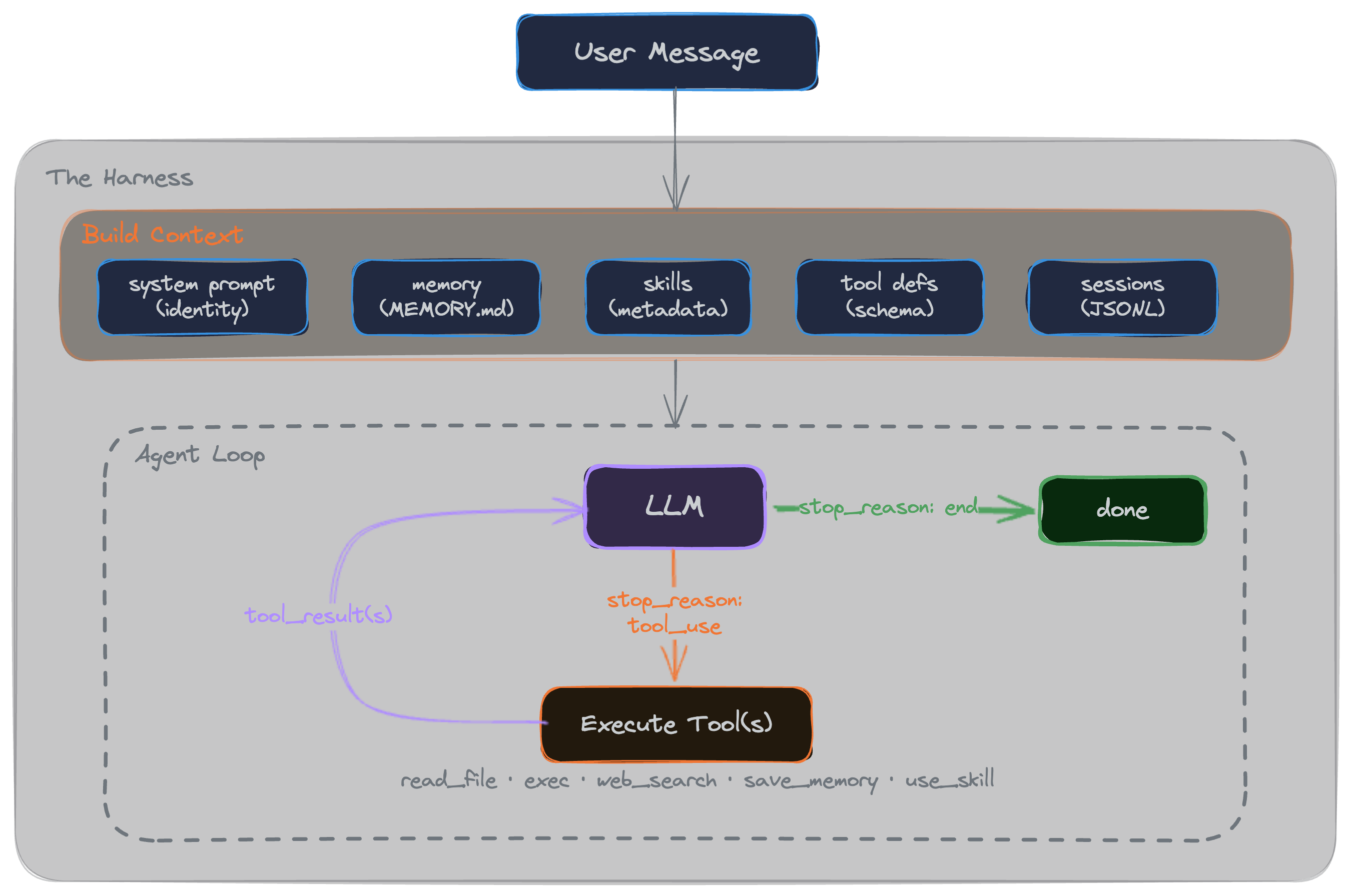
To understand how it actually runs, let's break down each of these pieces to see what they do under the hood.
Sessions
As we saw in the earlier example, without sessions, the agent forgets what you just said... every request is a blank slate. Sessions are just how we fix this: everything you talk about in a given session is stored locally (in a JSONL file) and sent back to the LLM on every single request. (That's exactly why you have to be careful with long conversations, the context just keeps adding up).
In Raked, we also save the history of each session, just in case it's useful for future integrations (like going back to previous sessions, RAG search, etc).
{"role":"user","content":"Yo, how are you?","timestamp":"2026-02-13T17:57:44.997Z"}

{"role":"assistant","content":[{"type":"text","text":"Hey! I'm doing well, thanks for asking. Ready to help out with whatever you need - whether it's coding, analysis, questions, or just chatting. What's up?"}],"timestamp":"2026-02-13T17:57:44.997Z"}

{"role":"user","content":"Can't you tell me what's the best framework/lib to build on Ethereum?","timestamp":"2026-02-13T17:58:21.996Z"}

{"role":"assistant","content":[{"type":"text","text":"For building on Ethereum, here are some of the top frameworks and libraries....."}],"timestamp":"2026-02-13T17:58:21.996Z"}
You eventually have to deal with this growing context by pruning old messages or running a background summarization job so you don't blow up your token limits. We skipped all that complexity in Raked to keep it minimal. When the context gets too heavy or the model starts losing focus, you just type /new to drop the baggage and start a fresh session.
Memory
The problem with sessions is that you lose ALL your conversation context the second you start a new one. But there is usually stuff you want the agent to remember across sessions (your name, preferences, etc). That's where memory comes in.
How do we decide what gets saved? It's literally just appending a few rules to the system prompt on every call:
## Memory Instructions

- Save when the user explicitly asks ("remember X").
- Save autonomously when you detect noteworthy facts or preferences — no confirmation needed.
- Keep notes concise. Only save durable facts, not ephemeral context.",
In Raked, whenever the agent decides it needs to remember something based on those rules, it just writes it down to a flat MEMORY.md file in the root directory. That file then gets read and injected right back into the prompt for every future session.
Tools
LLMs can reason, but they can't actually do things. Tools let the agent take deterministic actions in the real world.
To create a tool, you need some meta (name, a description, a JSON schema for parameters), and an execute function. You pass their definitions (just the metadata) in the context on every request, and the LLM decides when it needs to call one. For example, here is what our read_file tool looks like:
export const readFileTool: Tool = {
  name: "read_file",
  description: "Read the contents of a file. Path is relative to project root; cannot escape it.",
  parameters: {
    type: "object",
    properties: {
      path: {
        type: "string",
        description: "File path relative to project root",
      },
    },
    required: ["path"],
  },
  async execute(params) {
    const resolved = safePath(params.path as string);
    return await readFile(resolved, "utf-8");
  },
};
In Raked, we include a few basics out of the box: read/write file, an exec tool with an allowlist of commands, save to memory, use skills, and web search.
A thing to realize here is that the description isn't just a code comment or UI label, it's the actual instruction that tells the LLM when to use the tool. The model never sees the deterministic part (execute); it only sees that metadata. So if your agent isn't calling a tool when it should, you probably need to tweak the description string.
Skills
Skills are similar to tools, but instead of running code, they inject context and instructions into the conversation. Think of them as expert personas or specialized knowledge that the agent can activate on the fly.
This is super useful (and a very popular pattern right now) because it protects your context window. We only pass the skill's metadata to the LLM initially. The full text of the skill is only injected if the model explicitly asks for it.
In Raked, we include an ethereum-app skill as an example. Here is the metadata that gets passed into the LLM initially:
---
name: ethereum-app
description: Ethereum development tutor and builder for Scaffold-ETH 2 projects. Triggers on "build", "create", "dApp", "smart contract", "Solidity", "DeFi", "Ethereum", "web3", or any blockchain development task. ALWAYS uses fork mode to test against real protocol state.
---
When the LLM decides it needs this (e.g. the user wants to build an Ethereum dApp), it calls a standard tool (use_skill("ethereum-app")), and we append the full file contents into the context so the model can read it.
Skills vs. Tools
The main difference between the two boils down to deterministic vs. non-deterministic execution. In theory, tools are built for interacting with the outside world (running a script, writing a file, etc.), where you need a guaranteed, deterministic outcome. Skills, on the other hand, are non-deterministic: you're just giving the LLM a set of instructions or context and relying on its reasoning engine to figure out what to do with it.
But in practice, the line gets blurry. For example, you might think you need to write a rigid, custom tool to interact with a specific API. But sometimes, just writing a skill that hands the LLM the API documentation and lets it use a generic exec or curl tool is totally fine (and way faster to build). Just test and see what works best for you. Also, you aren't picking sides here; they're meant to work together. A good skill often just acts as the user manual for your tools.
Building the context
So with all those pieces mapped out, we can finally pull all the context together. Here is the final payload we build and send to the LLM API on every single call:
<system prompt>:  soul, identity, baseline rules
<memory>: what we've saved in memory.md from past sessions
<skills available>: the metadata (name, description) for unloaded skills
<tools>: all the available tools (metadata only)
<session history>: all the messages in the current conversation
<user message>: this will also include dynamically loaded skills, tool execution results, etc.
Agent loop
Now that we have all the pieces mapped out, we can look at the actual execution loop. When a user sends a message, the agent builds that context payload we just looked at, makes a call to the LLM, and waits for a response.
If the response includes a tool call (like "read this file" or "load this skill"), the system running Raked (i.e you local machine or server) executes it, appends the result to the context, and ships it right back to the LLM. This cycle loops continuously until the model decides the task is done, hits an "end" signal, and prints the final response to the user.
Getting Raked up and running
The best way to use Raked is to get it running locally, read the code, and extend it to adapt it to your needs.
Basic setup
Fork the repo, clone it, and run the standard setup:
git clone <your-fork-url>
cd raked
npm install
cp bot.config.example.ts bot.config.ts
Open bot.config.ts, paste in your Anthropic API key, and test that it works by running npm run dev.
Once you have it running, take some time to read through the code. Trace how the context gets built, how it enters the agent loop, and how it handles tool execution. It's small enough that you can hold the entire architecture in your head.
After you get a feel for how everything works, head back to bot.config.ts and drop in a telegramBotToken (to chat with it from Telegram) and a braveApiKey (to enable the web search tool).
Extend it
The whole point of this project is to give you a codebase small enough to fully understand, and then make it your own. We left some intentional limitations in place so the core logic stays readable. These make for great starting points if you want to fork it and start extending it:
- Anthropic SDK only: You can swap this out for your favorite provider or use a generic wrapper like the AI SDK from Vercel.
- Non-interactive exec, The agent can run shell commands but will get stuck if a CLI expects user input (like a
y/nprompt). - CLI + Telegram only: You can wire up support for Discord, Slack, or build a custom web UI.
- No scheduled tasks: Add a heartbeat, cron jobs, or reminders so the agent can act autonomously without you pinging it first.
- No subagents: It doesn't do parallel tool calls or delegate tasks to other specialized agents.
- No streaming: It waits for the full text payload before replying.
- No MCP: You can add MCP support to hook into external tools natively.
- Simple memory: It's strictly append-only. There is no background summarization or pruning.
Use cases
This is the million-dollar question. Everyone is playing with AI assistants right now, but what actual value do you get out of them once the novelty wears off?
Our advice: don't fall into the meta-procrastination trap of just playing with the agent forever. It's incredibly satisfying to wire all this up and watch it work on fake use cases, but beyond the initial exploration phase, the actual value is zero. Point it at a real pain point you actually have.